
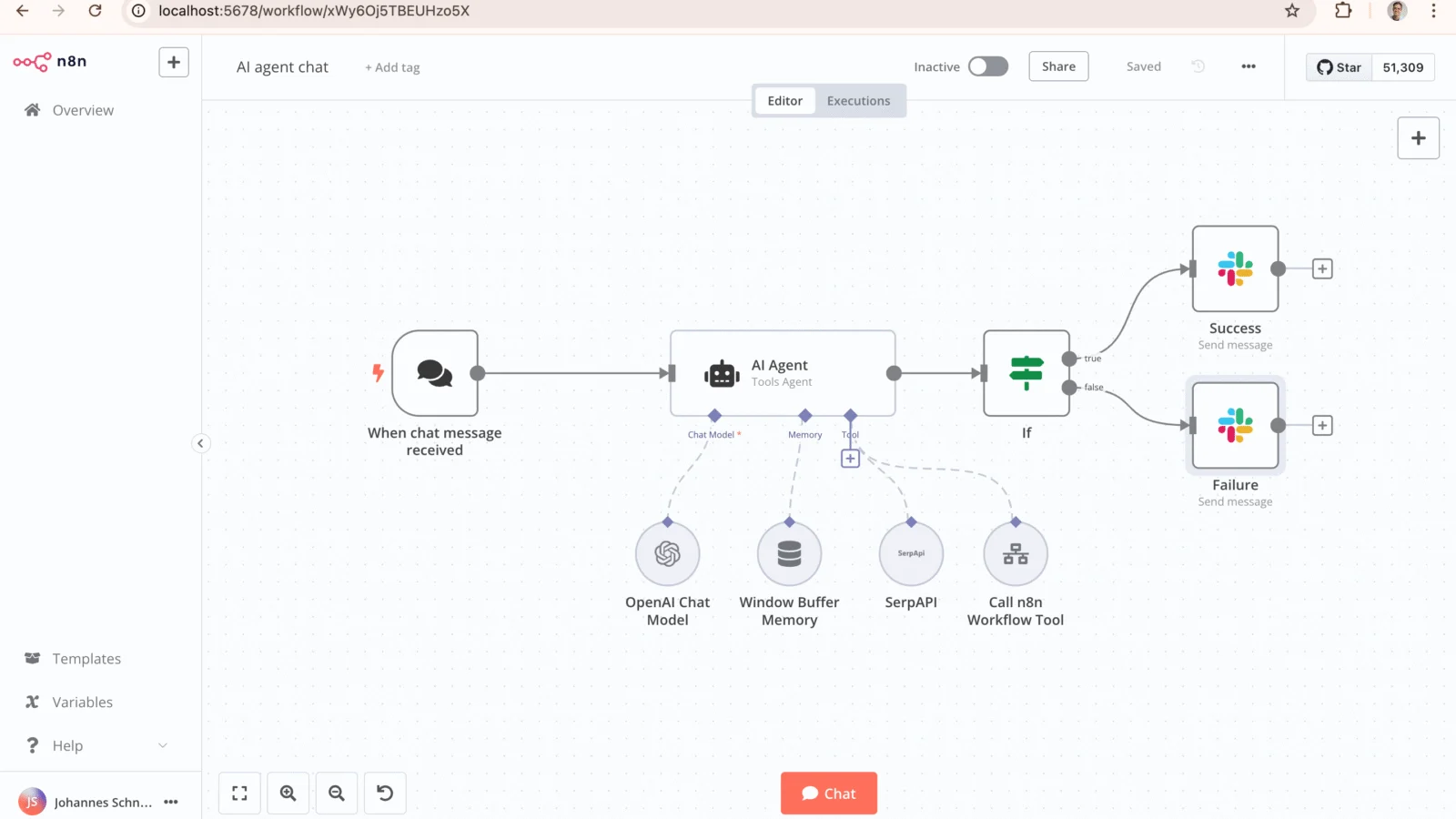
n8n automation (pronounced “n-eight-n”, short for “nodemation”) is a workflow automation platform that connects your apps, databases, and AI models into automated workflows through a visual, node-based editor. Unlike hosted tools that charge per task, n8n automation can be self-hosted with no per-execution fees, and it lets you drop in JavaScript or Python when the visual blocks aren’t enough. Founded in Berlin in 2019, it topped the 2025 JavaScript Rising Stars ranking and has repositioned itself around AI agents. In this guide, we break down n8n automation in plain English — what it is, how it works, and how to use it.
n8n Automation: What is n8n, exactly?
Definition: n8n automation is a fair-code workflow automation platform that lets users build automations by wiring together “nodes” — each representing an application, service, or operation — in a visual editor, with the option to add custom JavaScript or Python code. It runs as a self-hosted application or as a managed cloud service.
The name is a numeronym from “nodemation” — the node view, the Node.js runtime, and “automation” (Wikipedia). It was founded by Jan Oberhauser in Berlin and launched publicly in October 2019.
At its core, n8n automation moves data and triggers actions between the tools you already use: a new spreadsheet row can create a project-board task, send a Slack message, and update your CRM — automatically. It ships with 400+ native integrations, its official library lists 1,500+ including community-built nodes, and there are 9,000+ ready-made workflow templates to import (n8n’s official GitHub repository).
How does n8n work?
Every automation in n8n automation is called a workflow, and every workflow is built from nodes connected on a canvas. A typical workflow follows a simple pattern:
Trigger → Process data → Make decisions → Take action
There are a few node types to know:
- Trigger nodes start it — a webhook, a schedule, or an event like “new form submission”.
- Action nodes do the work — send an email, add a Sheets row, create a Trello card, call an API.
- Logic nodes control flow — IF conditions, loops, filters, error handling.
- Code nodes run custom JavaScript or Python for the rest.
Say you’re a freelance designer. A client fills in your contact form (trigger) → n8n automation checks your CRM for duplicates (logic) → creates the contact, sends a reply, logs the lead in a spreadsheet, and pings you on Slack (actions). Five manual steps become one automatic sequence. For more on AI-assisted data work, see AI Spreadsheet Tools: What Shortcut AI Does for Excel.
What makes n8n different from Zapier and Make?
n8n automation is often described as a self-hostable alternative to Zapier and Make. The differences that matter most are hosting, billing, and flexibility:
| n8n automation | Zapier | Make | |
|---|---|---|---|
| Hosting | Self-host or managed cloud | Cloud only | Cloud only |
| Billing unit | Per workflow execution (one run = one unit, however many steps) | Per task (each action step bills) | Per operation (each module step bills) |
| Integrations | 400+ native nodes; 1,500+ incl. community | 9,000+ apps | 3,000+ apps |
| Custom code | JavaScript/Python code nodes anywhere | Limited | Limited |
| Free option | Self-hosted Community Edition: free, unlimited executions | 100 tasks/month | 1,000 operations/month |
| Learning curve | Steeper — rewards technical users | Gentle — built for beginners | Moderate |
Counts per 2026 comparisons (n8n vs Zapier in 2026) and n8n-io on GitHub.
The billing unit is the real story: a 20-step workflow run 1,000 times a month is 1,000 executions on n8n, but roughly 20,000 tasks on a per-step platform. That’s why n8n wins on cost at scale, while Zapier wins on simplicity for beginners.

What are n8n’s AI capabilities?
n8n automation reoriented around AI from 2024, and AI features are now central to its growth:
- AI Agent node: agents inside workflows that call LLMs, use tools, keep memory, and make decisions — built on LangChain’s framework.
- Model flexibility: connect OpenAI, Anthropic’s Claude, Google models, or open-source models and switch providers without rebuilding.
- RAG pipelines: native vector-database support, so agents answer from your own documents.
- MCP support: consume tools from external Model Context Protocol servers, or expose n8n automation workflows as an MCP server to tools like Claude Desktop.
- Natural-language builder: describe the automation you want in plain English and n8n drafts the workflow.
In 2026, n8n also launched n8n Agents in preview on n8n Cloud: standalone assistants that sit alongside workflows. You describe the outcome, pick a model, connect tools and channels (Slack, Telegram, Discord, Linear), and the agent decides the steps — with memory, approvals, and scoped credentials (DEV Community). The AI shift is working: by late 2025, over 80% of workflows on the platform involved AI agents (Sacra).
Exploring AI tooling more broadly? See Best Free AI Tools for Students in 2026.
Is n8n really open source?
Here’s the honest answer most explainers skip: it is source-available, not open source in the strict sense.
The company calls its model “fair-code.” The code is public, and you can self-host and modify it — but it’s published under it’s Sustainable Use License (adopted in March 2022), which restricts commercial use: notably, you can’t resell it as a competing hosted service. Because of these restrictions, the license sits outside the Open Source Initiative’s Open Source Definition, and commentators describe it as source-available rather than open source (Wikipedia).
In practice, freelancers and businesses automating their own work get the Community Edition free to self-host with no execution limits — genuinely free. The license mainly matters if you plan to build a commercial product on it or offer it as a hosted service. Check the official it docs license terms before doing that.
How much does n8n cost?
Every plan includes unlimited users and workflows — you pay per execution (one full workflow run, however many steps). Annual-billing rates from it’s pricing page (via Affmaven and Gizmodo):
| Plan | Price (billed annually) | Executions/month |
|---|---|---|
| Community (self-hosted) | Free | Unlimited |
| Starter (cloud) | €20/mo | 2,500 |
| Pro (cloud) | €50/mo | 10,000 |
| Business | €667/mo | 40,000 |
| Enterprise | Custom | Custom |
Self-hosting the Community Edition on a small VPS (around $5–10/month) is the cheapest real-world setup — often cheaper than any per-task platform once workflows run daily.

Who should use n8n?
it is built for people who are comfortable with a little technical depth and want control in return — which describes a lot of freelancers:
- Freelancers & agencies: automate client onboarding, lead capture, invoicing reminders, and status reports — without a per-task bill that grows with every client.
- Developers & technical marketers: code nodes, API access, and a version-control-friendly setup reward basic JavaScript skills.
- Startups & small teams: self-hosting keeps client data on your own server; execution-based pricing scales predictably.
- AI builders: one of the fastest ways to wire LLMs and RAG pipelines to real business systems.
It’s not for you if you want automations running in twenty minutes with zero setup — Zapier or Make are faster there. If your work revolves around a PM stack, read How to Pick Project Management Software (2026 Guide) first, then connect your chosen tool to everything else with it.
How do you get started with n8n?
- Try the cloud first. Sign up for it Cloud to test the editor with no server setup.
- Or self-host with Docker. On any VPS with Docker installed, run:
docker volume create it_datadocker run -it --rm --name it -p 5678:5678 -v it_data:/home/node/.It docker.It.io/itio/it
Then openhttp://localhost:5678in your browser (per it’s official quick-start). - Import a template. Browse the 9,000+ templates at it.io/workflows and adapt one close to your use case.
- Build one small workflow. Start with one trigger and two or three nodes — e.g., “new form submission → add to spreadsheet → notify me” — testing each step.
- Add credentials carefully. Connect one app at a time; use the forum at community.It.io when stuck.
Frequently asked questions
Is n8n really free?
Yes — the self-hosted Community Edition is free with unlimited workflows and executions; you only pay for your own server (roughly $5–10/month for a basic VPS). Cloud plans start at €20/month billed annually for 2,500 executions. There’s no permanent free cloud tier, only a trial.
Is n8n actually open source?
Not strictly. It is source-available under its “fair-code” Sustainable Use License: the code is public and free to self-host, modify, and use for your own business, but you can’t resell it as a competing hosted service. It doesn’t meet the Open Source Initiative’s definition of open source.
Is n8n better than Zapier?
It depends. It wins for technical users, high-volume automations, self-hosting, and AI agent workflows — and it’s usually far cheaper at scale because it bills per workflow execution rather than per task. Zapier wins for beginners, with 9,000+ integrations and a gentler learning curve.
Can n8n build AI agents?
Yes. It offers a LangChain-based AI Agent node, vector-database support for RAG, connections to OpenAI, Anthropic, Google, and open-source models, plus Model Context Protocol support. In 2026 it also launched standalone it Agents (in preview on it Cloud) for channels like Slack and Telegram.
Do I need coding skills to use n8n?
No — basic automations can be built entirely with the visual editor. But it rewards technical users: knowing a little JavaScript unlocks the code nodes, custom API calls, and complex logic that set it apart from simpler tools. Expect a learning curve steeper than Zapier’s.

Developers, designers and marketers who build websites, software, apps and automations for businesses worldwide. Our editorial policy


2 comments